
Choosing between Wan 2.2 Animate and Kling 2.6 for swapping a face into video
Want the swap free, controllable, and running on your own machine, with lighting that matches the scene automatically? Choose Wan 2.2 Animate. Need a talking character with built-in sound and a face that stays put across longer, camera-moving shots? Choose Kling 2.6. This is a face and character swap decision, not a generic video-quality ranking, so the four things that actually decide it are identity hold, lighting integration, native audio, and the real cost of one finished clip.
Wan is Alibaba's open-source model under the Apache 2.0 license: free, self-hosted, with full commercial rights and local inference at zero cost, per scribehow.com. Kling is a paid, hosted, cinematic model from Kuaishou, starting at $6.99/mo. The split below maps each face-swap criterion to a winner so you can stop reading early if your priority is already clear.
| Face-swap criterion | Winner | Why |
|---|---|---|
| Identity hold across the clip | Kling 2.6 | Keeps a character consistent across angles and longer durations; Wan can drift. |
| Lighting and scene integration | Wan 2.2 | Relighting LoRA matches scene light and color tone automatically after replacement. |
| Native audio and lip-sync | Kling 2.6 | Generates sound and multi-language lip-sync in one pass; Wan is silent in most modes. |
| Cost per finished swap | Wan 2.2 | Free self-hosted; Kling charges subscription plus per-second API that retries inflate. |
| Resolution and duration | Kling 2.6 | 1080p with extension to roughly three minutes; Wan base clips are short. |
| Open-source and licensing | Wan 2.2 | Apache 2.0 with full commercial rights; Kling allows commercial use on paid plans. |
How each one actually swaps a face
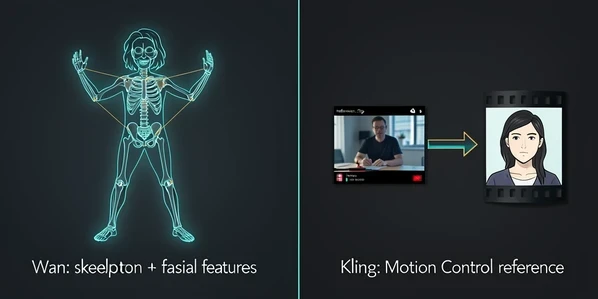
The two models reach a swap by different routes, and that difference explains nearly every result gap further down. Wan 2.2 Animate takes a performer video and an uploaded character image, then transfers the performer's body motion and expressions onto your character. It does this with spatially-aligned skeleton signals for the body and implicit facial features for expression reenactment, according to wan-animate.io. One unified framework handles both straight animation and character replacement through a common symbolic representation, so you are not switching tools to go from animating a character to replacing one.
Kling 2.6 works from the other end. Its Motion Control reads a 3 to 30 second reference video, dance, martial arts, a set of gestures, and maps that movement onto an AI character, per piapi.ai. Wan reads a skeleton; Kling reads a reference performance. Both expect a single character in the input: wan-animate.io and the easemate.ai generator both note that the image and the video should contain only one person, so crowded source clips are the wrong starting point for either.
Identity consistency: which face holds across the clip
Kling holds identity better. It keeps a character recognizable across angles and longer durations, while Wan is more prone to losing the face over longer clips, as seaverse.ai reports. The failure is concrete: run the same character image through the same clip on both models and push a camera move through it. Wan's face can start to drift, and community reports go further, describing Wan characters morphing into a visibly different person mid-shot. Kling tends to keep the same person from first frame to last.
There is a counter-move for Wan. Feeding it multiple reference images of the character helps it hold identity, which narrows the gap. And clip length matters more than the headline suggests. On a short swap of a few seconds, both models keep a face well enough that the difference barely shows. The drift is a long-clip problem. So a reader asking whether Wan can swap a face on a one-hour video has the answer baked into the mechanism: that is exactly the range where identity slips, and where Kling's consistency, or a tightly multi-referenced Wan setup, earns its keep.
Edge cases sharpen the same point. Profile turns, partial occlusion, and extreme expressions are the moments a swap is most likely to break on either model, because the face leaves the angle the reference best describes. Keep those moments short, or hold them on a clean frontal frame, and both models cope better.
Lighting and scene integration
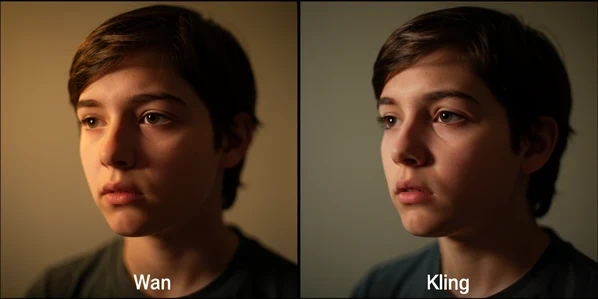
This is Wan's standout swap advantage. Its Relighting LoRA preserves the character's appearance while applying the scene's environmental lighting and color tone, so the swapped character blends in without manual color correction, per wan-animate.io. A swapped face that ignores scene light is one of the most common ways a swap reads as fake: the character sits in shadowed footage but glows like it was lit on a different set. Relighting closes that seam automatically.
Kling has no equivalent automatic relighting called out in its inputs. That does not make Kling's output bad, its cinematic motion can look excellent, but it does mean a mismatched swap may need a color-grading pass you would not need on Wan. Picture the same character dropped into a warm, low-light interior: relit on Wan, it picks up the amber and the falloff; on a tool without relighting, you are matching tones by hand afterward.
Audio and lip-sync
Kling wins this outright for any talking swap. Kling 2.6 generates native audio, sound effects, dialogue, and ambient music, in a single pass, with natural multi-language lip-sync, according to piapi.ai. So a spokesperson swap comes out of Kling already speaking, with mouth movement that tracks the words. Wan's native audio and lip-sync are very limited or absent in most modes, which leaves you with a silent clip to score and sync separately.
The split is clean. Dialogue, presenter, and brand-spokesperson swaps favor Kling, because the sound and the lips arrive together. Silent action, dance, and motion swaps are perfectly fine on Wan, since there is nothing to lip-sync in the first place. Match the model to whether the character needs to talk.
Resolution, clip length and limits
The hard numbers constrain what each swap project can be. Wan 2.2 outputs 480p to 720p at base and reaches 1080p through an advanced VAE, with a short base clip length, per scribehow.com. Kling 2.6 delivers 1080p and can run up to about three minutes using video extension, with its Motion Control reference input sitting in that 3 to 30 second window, per dreamega.ai. If the finished swap needs to be long and high-resolution in one piece, Kling has the headroom; Wan gets you there in shorter segments.
Upload ceilings decide your inputs before generation even starts:
- Wan, on wan-animate.io: character image up to 10MB, performer video up to 30 seconds.
- Wan, on the easemate.ai generator: JPG, JPEG, PNG or WEBP up to 20MB per file and a reference video up to 120 seconds, one character only.
- Kling Motion Control: a reference video of 3 to 30 seconds.
Cost per finished swap
List price and real cost are not the same number, and for swaps the gap is the whole story. Wan is free and self-hosted at zero cost under Apache 2.0, per scribehow.com. Run it on your own hardware and a finished clip costs nothing but electricity and your time. Online Wan generators do charge: roughly 480p at 1 credit per second with a 5-credit minimum, and 720p at 2 credits per second with a 10-credit minimum, per wan-animate.io. Kling starts at $6.99/mo as a subscription, with API pricing around $0.084 per second and cited elsewhere at $0.07 to $0.14 per second, per scribehow.com and dreamega.ai.
Now factor one-take success rate, because that is what turns list price into real price. Paid models burn credits on every retry, and swaps rarely land perfectly first try when a face drifts or an expression goes wrong. Three attempts at a 720p clip on Kling's per-second API is three times the per-second cost for one usable result, so your true cost-per-finished-clip sits above the headline rate. Self-hosted Wan inverts the trade: retries are free, but you have paid up front in hardware and the technical setup to run it.
A cheap per-second rate is not a cheap clip. Multiply the rate by how many takes a swap actually needs before it holds identity and lighting, and compare that to Wan's free-but-self-hosted retries.
Licensing and commercial use
Wan 2.2 is open-source under the Apache 2.0 license, available on GitHub and Hugging Face, with full commercial rights and zero-cost local inference, per scribehow.com. For commercial swapped-face video, that is about as unrestricted as it gets. Kling permits commercial use on its paid plans, while Wan's terms are generally permissive but can vary by where you run it, as seaverse.ai notes, so read the terms of whichever online Wan generator you use rather than assuming the base license carries over.
One caution sits above licensing. Swapping a real person's face into video needs that person's consent, and the provider's own terms may restrict it regardless of the model's commercial license. Check both before you publish a swap of an identifiable individual.
Which to pick by use case
Map the criteria onto who you are:
- Budget developers and anyone running large-scale, repeated swaps: Wan, since each generation is free once it is self-hosted and the model is efficient for volume.
- Viral social and brand-spokesperson clips that need native audio plus rock-steady identity: Kling.
- Privacy or full local control, with nothing leaving your machine: Wan, self-hosted.
- Beginners who want no install at all: Kling hosted, or a Wan online generator if you would rather stay in the Wan ecosystem.
Read the choice through the four deciding criteria and it resolves fast. Identity on long, moving shots and a talking character point to Kling. Free repeat generation, automatic relighting, and local privacy point to Wan. For a deeper spec-by-spec breakdown of the two, piapi.ai runs the comparison alongside Kling's audio behavior.