
Reliable face and head swaps in ComfyUI with Flux Klein and the BFS LoRA
A BFS swap comes down to two decisions you make before generating. Pick the right .safetensors for a face-only or full-head swap, then feed the two control images in the order that version expects and paste its matching base prompt. Get those right and the swapped face respects the target scene's lighting instead of sitting on top of it. Get the image order wrong and the swap breaks outright. Everything below maps each BFS version to its base model, its Image 1 / Image 2 order, its filename, and its prompt, with fixes for the failures people actually hit.
What you need before you start
Five things have to be in place, or a step stalls partway through. The base model and the LoRA must match: a Qwen LoRA will not behave correctly on a Klein base, and the reverse fails too.
- A compatible base running in ComfyUI: Flux 2 Klein 4b or 9b, or Qwen Image Edit 2509 / 2511.
- The correct BFS
.safetensorsLoRA file for that base and for the swap type you want. - Two control images, one clear face source and one body or base image.
- The downloaded BFS Head/Face Swap ComfyUI workflow.
- Enough VRAM for the base you chose. Flux 2 Klein 9B is heavier than 4B, so plan for it.
The BFS LoRA and its workflow come from Alissonerdx on Hugging Face. Grab the file that names your exact scenario in its filename rather than the first one you see.
Pick the right BFS version: face swap vs head swap
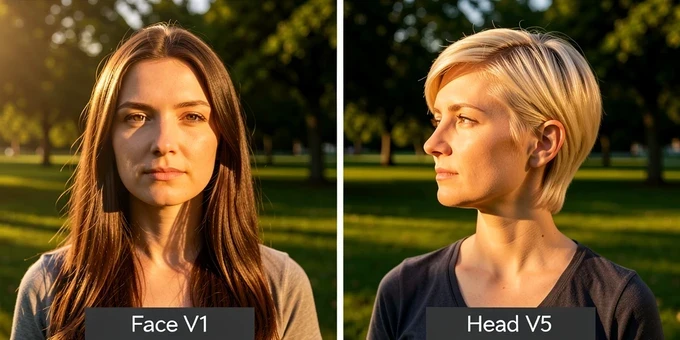
Decide what you want to move. BFS Face V1 swaps only the face and leaves the original hair untouched. The Head versions, V1 and V5, transfer the full head including hair, which is what you want when the hairstyle should travel with the identity. Loading a face-only LoRA and expecting hair to come along is one of the most common early mistakes.
Each swap type ships against more than one base. There are builds for Qwen Image Edit 2509, Qwen Image Edit 2511, and Flux 2 Klein in both 4b and 9b. The 4b and 9b Klein variants trade quality for hardware headroom: 9b resolves finer detail but demands more VRAM, while 4b runs lighter and is the sane pick on a constrained card.
One nuance worth knowing on the 2511 line. The merged BFS Head V5 build blends the V4 weights, trained on 2509, into the 2511-trained original. The result widens the range of expressions you can pull, which helps when the original 2511 model feels stiff or locked into a narrow set of faces.
The control-image order cheat sheet (the #1 thing people get wrong)
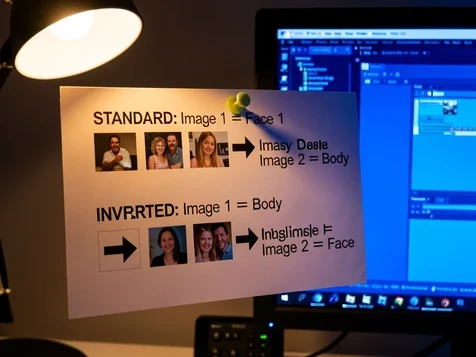
Order is inverted on the newer head models, and this single detail wrecks more swaps than anything else. Older builds take the face first. Newer ones take the body first. There is no visual warning when you get it backwards: the model simply produces a broken result.
- Standard order, used by Face V1 and Head V1 on 2509: Image 1 = Face, Image 2 = Body.
- Inverted order, used by Head V3, V4, V5 and every Flux Klein version: Image 1 = Body, Image 2 = Face.
- Send the two images in the wrong slots and the swap fails completely, so this is the first thing to recheck when output looks scrambled.
| BFS version | Base model | Image 1 / Image 2 | Filename | Base prompt |
|---|---|---|---|---|
| Face V1 | Qwen Image Edit 2509 | Face / Body | bfs_face_v1_qwen_image_edit_2509.safetensors | face swap face from Image 1 to Image 2 |
| Head V1 | Qwen Image Edit 2509 | Face / Body | bfs_head_v1_qwen_image_edit_2509.safetensors | head swap from Image 1 to Image 2 |
| Head V5 | Qwen Image Edit 2511 | Body / Face | bfs_head_v5_2511_original.safetensors | head_swap, Picture 1 base, Picture 2 head |
| Head V1 | Flux 2 Klein 4b/9b | Body / Face | bfs_head_v1_flux-klein_9b_step3500_rank128.safetensors | head_swap, Picture 1 base, Picture 2 head |
Step by step: load the LoRA and run the swap in ComfyUI
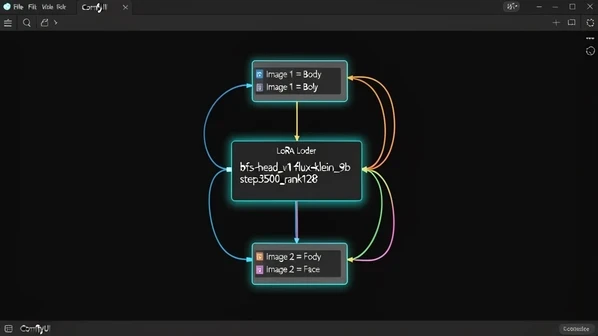
Open the BFS Head/Face Swap workflow and load the .safetensors that names your scenario. For a face-only swap on Qwen that is bfs_face_v1_qwen_image_edit_2509.safetensors. For a 2511 head swap, bfs_head_v5_2511_original.safetensors or one of the merged rank-16 / rank-32 variants. For Flux Klein 9B, bfs_head_v1_flux-klein_9b_step3500_rank128.safetensors, with bfs_head_v1_flux-klein_9b_step3750_rank64.safetensors as the lighter rank-64 option.
- Load the chosen
.safetensorsinto the LoRA loader node in the BFS workflow. - Wire your two control images into Image 1 and Image 2 exactly as the cheat sheet says for that version. This is where most failures happen, so confirm it before anything else.
- Paste the base prompt that belongs to the loaded version from the library below.
- Run the workflow, then check blending at the jaw and hairline, skin tone against the body, and whether the identity survived.
On a tight VRAM budget, reach for the Klein 4b build, or the rank-64 9b file instead of rank-128. You lose a little fidelity and you keep the workflow from spilling out of memory mid-run.
Copy-paste prompt library per BFS version
Each version expects its own phrasing. Face versions talk about Image 1 and Image 2; the head models on 2511 and Klein switch to Picture 1 and Picture 2. Match the prompt to the loaded LoRA, or the swap degrades even when the image order is right.
Face V1 (Qwen 2509). Base: face swap face from Image 1 to Image 2. Optional add-ons when you need them: swap only the face and not the hair, match the skin tone to Image 2, keep Image 2's pose and lighting.
Head V1 (Qwen 2509). Base: head swap from Image 1 to Image 2. As an alternative, ask it to keep all facial details and hair from Image 1 with a perfect skin match blended into Image 2's body.
Head V5 (Qwen 2511). Use a head_swap prompt that takes Picture 1 as the base and keeps its lighting, environment, and background, removes Picture 1's head and replaces it with Picture 2's head, strictly preserves Picture 2's hair, eye color, and nose structure, then copies Picture 1's eye direction, head rotation, and micro-expressions. Close it with high quality, sharp details, 4k.
Head V1 (Flux Klein). Same shape as V5: start from Picture 1 as the base image, keep its lighting, environment, and background, then remove Picture 1's head completely and replace it with Picture 2's head.
If a skin tone or pose looks off, add the optional phrase rather than re-rolling blindly. Telling the model to match the target's skin tone and keep its pose and lighting fixes far more than another random seed will.
Troubleshooting: blending, skin tone, identity, and the pasted-on look
Most BFS failures trace back to one of four causes, and each has a one-line fix. The pasted-on look, hard edges and a face that keeps its source lighting instead of the target scene's, is exactly what the Flux 2 Klein 9B plus BFS setup is built to remove; community testers report it forces the swapped face to respect the target's environmental lighting and holds up even on real-to-anime swaps.
- Pasted-on, hard-edged result with mismatched lighting: the swap kept the source face's light. Use a Klein head version and let it adapt the face to the target scene.
- Completely broken output: the control images are in the wrong slots. Recheck the cheat sheet and confirm Image 1 / Image 2 for your version.
- Skin tone mismatch or lost identity: the model had no instruction to hold them. Add the match-skin-tone and preserve-identity phrases to the prompt.
- Soft or low-detail face: run a second img2img detail pass to sharpen texture.
That last fix is worth detailing. One community dataset workflow runs the swap in Flux Klein 9B with bfs_head_v1_flux-klein_9b_step3500_rank128.safetensors, then sends the output through a Z Image Turbo img2img pass to refine facial texture. For the cleanest result, mask back only the new face after the refiner so the base image's other details stay intact.
A worked Flux Klein head swap
Say you want a stylized result: a real photo turned into an anime character while keeping the original scene and pose. Load bfs_head_v1_flux-klein_9b_step3500_rank128.safetensors. Set Image 1 to the body, the stylized base scene, and Image 2 to the face you are transferring, the inverted order Klein always uses. Paste the head_swap prompt that names Picture 1 as the base and replaces its head with Picture 2's. Generate, then judge the hairline blend and lighting before deciding whether a detail pass is needed.
Advanced (optional): training your own BFS-style Flux Klein LoRA
If you want to train rather than just run, here is the author's recipe in brief. It is built with ai-toolkit on triplets: one target image paired with two control images, image1 the body and image2 the face. Keep paired control and target dimensions identical, since a mismatch like control 1024x1024 against target 512x1024 harms learning.
Flux Klein was trained at rank 128, with rank 64 for the other variant, on roughly 300 image pairs over about 3500 steps. Resolution climbed over the run, starting low at 256 and 512 and rising toward 1024 and 1536. High-noise timesteps come early to lock in structure, low-noise timesteps later to refine detail.
Watch the loss curve. The author starts considering a stop once loss drops below 0.10, while steering clear of a very low value that signals overfitting. And dataset quality carries the result: well over half of training success rides on a consistent set of more than 100 clean, clearly captioned samples, not on the config.
Consent and responsible use
One rule from the BFS author governs all of this. Do not use or share results that involve public figures or anyone who has not given consent. The tooling makes convincing swaps trivial, which is exactly why the responsibility sits with you, not the model.