
Make your face a worse training sample: a photo-first defense against deepfakes
You cannot un-publish a face that is already online. What you can do is make it poor raw material. The defense works in layers: reduce how much high-quality face media you expose, degrade what you must still share, then monitor for misuse. None of this needs paid software. Most of it is a settings sweep plus a few free tools like Glaze, Nightshade, and Have I Been Trained. The everyday user who does all three lowers their risk far more than anyone relying on a single trick.
Why your ordinary photos are the raw material for deepfakes
A deepfake is assembled, not invented. It is built from ordinary photos, videos, and voice recordings scraped from social media and other public sources, as Fortinet describes it. The cleaner that source material, the more convincing the result.
High-resolution close-ups are the prize. Long, clear clips of your face with consistent angles and lighting give a cloning model exactly what it needs, because more detail and more repetition make realistic synthesis easier. The stakes are not abstract: Fortinet reports that up to 96% of deepfakes online are non-consensual pornography. Demand for the underlying tools is climbing too, with searches for free voice-cloning software up 120% between 2023 and 2024, according to SunLife.
And here is the uncomfortable part. Deleting a photo does not recall the copies that were already shared or scraped. A reposted image, a cached page, a friend's download: any of these can outlive the original. So the real leverage is upstream, in what you let become public in the first place.
Before you start, line up a few basics: access to the privacy settings on each of your accounts, an honest sense of which photos and videos of you are already public, a device that can run Glaze or Nightshade if you want to cloak images, and, for creators, access to your site backend plus a metadata tool such as ExifTool.
Step 1: reduce how much high-quality face media of you is public
Start by starving the model. Every HD portrait you do not post is training data that never exists. Stop publishing high-resolution close-ups and long, steady videos of your face, especially the flattering ones shot at consistent angles in even light. Those are the frames a cloning pipeline loves most.
- Sweep your old posts and delete or restrict public face media you no longer need, knowing deletion cannot pull back copies that were already scraped.
- Split your presence: keep identifiable face media on a private account shared only with people you trust, and treat any public account as a stranger's feed.
- Ask friends, family, schools, and photographers not to tag or upload images of you without asking first.
- Audit which third-party apps can reach your camera roll, then revoke the ones you stopped using.
That last point gets skipped a lot. An old photo-editing app or quiz game may still hold standing access to your gallery, quietly exporting whatever you shoot. Pull the permission and the leak closes.
Step 2: make the photos you do share harder for AI to reuse
Some photos have to go public. Degrade them on the way out. Resolution is your cheapest weapon: upload a smaller, lower-resolution version, and blur or crop the face out entirely when identity is not the point of the shot. Fine detail is what cloning relies on, so removing it costs the attacker more than it costs you.
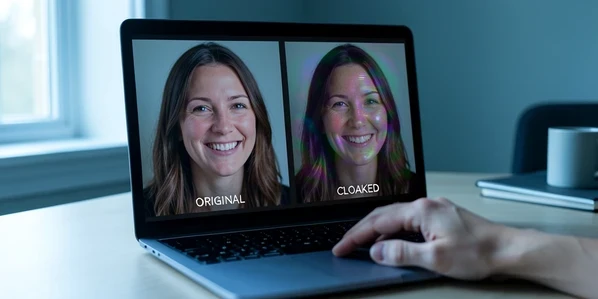
Next, cloak. Tools like Glaze and Nightshade apply data-poisoning perturbations that are nearly imperceptible to people but make a scraped copy far less useful for AI training, as Proton explains. Run your images through one before posting. Expect a small quality trade-off and some processing time per image, the price of making your face confusing to a model rather than crisp.
Watermarks belong here too, but with a warning. They discourage casual reuse and assert ownership. They do not stop a determined model: AI can erase a watermark, and a heavy mark spoils the photo for the humans you actually wanted to reach, per Pixsy. Use it as one layer, never the whole wall. The point of this step is stacking: low resolution, plus cloaking, plus a light watermark, beats any one of them alone.
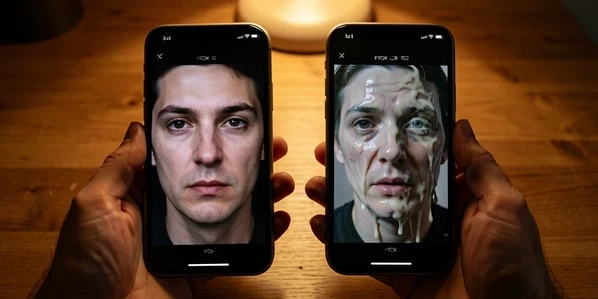
Step 3: lock down privacy settings and opt out of AI training
Control the audience before you worry about the algorithm. Set accounts to private, restrict past and future posts to friends-only, and limit who can download, share, or repost what you publish. A photo that never reaches a public crawler is a photo no scraper indexes.
- Turn off any facial-recognition feature and switch tagging to manual approval, so nothing gets attached to your name without your sign-off.
- Restrict who can find your profile by email address or phone number.
- Use your GDPR and platform rights to opt out of AI training, including opting out of Meta AI using your data across Facebook, Instagram, and WhatsApp.

Do not mistake a private account for a private vault. The platform itself may still access and process your data under its own terms, and Proton notes that Meta may use Meta AI interactions for targeted ads and to improve its AI systems. Opting out narrows the exposure; it does not erase the company holding your files. Read the AI-usage policy once, then decide what you are willing to upload at all.
Step 4: protect children and family photos
Children deserve the strictest setting, not the loosest. Their faces change as they grow, yet old public images can still feed AI training and follow them for years. The cute first-day-of-school album you posted a decade ago is still scrapeable today.
So make children's accounts private from the start, and move family photo-sharing into closed channels: a private album, a family-only chat, a group with manual invites. Then trim the back catalogue. Reducing the public archive of identifiable kids is one of the highest-value cleanups a parent can do, and it costs nothing but an evening.
Step 5: monitor whether your face is already exposed or misused
Prevention without detection leaves you blind. Check what is already out there. Have I Been Trained lets you search whether your photos appear in known AI training datasets, which is the fastest way to learn you are exposed before someone else does.
- Run a reverse image search on your most-circulated photos every month or two to surface scraped or impersonating copies.
- Search your own name across the major platforms the way a stranger would.
- Create Google Alerts for your name so impersonation attempts reach your inbox instead of staying hidden, a habit InTheBlack recommends for catching false content early.
One easy-to-miss habit closes the loop: recheck your privacy and AI-training defaults after every major platform update. Updates routinely reset toggles to their permissive state, and a setting you switched off last year may be quietly back on.
If you run a website or post as a creator
Publishing on your own domain adds defenses an everyday user does not need. Block known AI web crawlers in your robots.txt so the named bots are told to stay out:
User-agent: GPTBotDisallow: /then add a matching block for each named AI crawler you want to refuse.
At the file level, embed a data-mining opt-out using the IPTC Photo Metadata Standard, updated to version 2023.1 with a 'Data Mining' property that lets a rights owner declare whether an image may be used for AI or machine learning, as Pixsy documents. You can write that property into your images with ExifTool. For active defense, a WordPress plugin such as Kudurru detects scraper bots and can serve them corrupted images instead of your originals.
Treat metadata as a request, not a lock. Regional legislation may overrule the IPTC specification, so a 'do not mine' flag carries real weight in one jurisdiction and little in another. Pair it with the crawler blocks and bot detection above rather than trusting it alone.
How well does each protection actually work?
Most guides sell these tools as fixes. They are not. Watermarks can be erased by AI and degrade the image for human viewers, which is why Pixsy frames them as a supplement rather than a shield. Cloaking is stronger but not permanent: research suggests Glaze and Nightshade may be weakened as AI systems evolve, so a poisoned image safe today could be readable tomorrow.
Read that as a durability ranking, not a reason to give up. Every method is a single layer with its own shelf life, and that shelf life shrinks as models improve. The two protections that age best are the dullest ones. Low-resolution uploads and simply sharing less remain the most reliable baselines, because they remove the fine detail cloning depends on instead of trying to outsmart a system that keeps getting smarter. Cloak and watermark on top of that baseline. Never in place of it.