
Copy-paste face swap prompts, ranked by how often they actually work
If you want a clean swap on the first paste, lead with the Nano Banana gender-swap placement prompt: framing the edit as a gender change pushes scene-placement success from 5% to 85%, according to Banana Designer. Below it sit prompts for Midjourney, OmniGen, EaseMate, and Pixelcut, each shown verbatim with the model it runs in and the exact thing that breaks it. The order is reliability, not tool fame.
How we ranked these face swap prompts
Reliability decides the order here: how often a prompt produces a clean, usable swap and how consistent the result is across attempts. Tool popularity does not enter the math. A prompt that lands four times in five outranks a famous app whose default instruction fails half the time.
Three things make a prompt copy-paste-ready. It names the source face. It names the target image you are dropping that face into. And it spells out what must survive the edit: anatomy, lighting, skin tone. Skip any of those and the model guesses, which is where credits go to die.
One input dominates everything downstream. A front-facing, well-lit source photo makes every prompt below work better. Extreme angles, heavy makeup, and accessories all fight the model, so feed it the cleanest face you have before you blame the wording.
The gender-swap placement prompt (highest documented success rate)
This is the one to try first. Banana Designer documents that framing a swap as a gender change lifts person-placement success from 5% to 85% in Nano Banana, because the instruction forces the model to actually place the new face into the reference scene instead of redrawing what is already there.
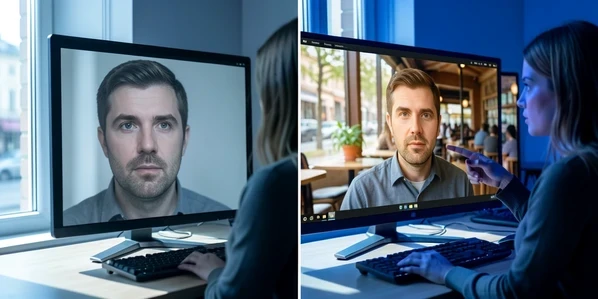
Take the person in image 1 and change them into a woman, placing her naturally into the scene from image 2. Keep her facial features, skin tone, and lighting consistent with image 2, and match the camera angle and shadows of that scene.
Paste that, swap the gender word to fit your source, and point image 1 and image 2 at your two uploads. The phrasing does the heavy lifting. Nano Banana 2 runs at roughly half the cost of the Pro tier, so iteration is cheap.
Now the failure mode. When both images contain people of the same gender, the trick collapses and the model often hands back the original picture untouched. That is the textbook reason a swap returns the input unchanged. It is also not 100% reliable even when the genders differ, so budget a few retries.
Midjourney /describe + InsightFace seed-ID prompt
When you need the same face to recur across images, run the reverse-prompt workflow. Feed your reference photo to Midjourney /describe, which turns the image into a written prompt, then pin a seed ID so InsightFace can hold character consistency from one generation to the next.
- Run
/describeon the source photo and pick the generated prompt that reads closest to your subject. - Generate, then note the seed of the result you like and append
--seed <id>to lock it. - Feed that consistent face through InsightFace, finishing in Adobe Generative Fill if the blend needs cleanup.
Set expectations honestly. ZDNET, walking through this exact Midjourney and InsightFace route, says to expect five, 10, even 20 different tries before you get something you like. Face matching is genuinely inconsistent, and a few of the steps are Discord-only, so it is the patient creator's prompt rather than the one-paste win.
Text-prompt-driven tool prompts (OmniGen, Pixelcut, EaseMate)
Some tools take a single text instruction with the image baked in, no node graph required. OmniGen is the clearest case: it embeds image tokens directly in the text prompt, so a swap runs with no ControlNet and no IP-Adapter, per MimicPC. The catch is cost on your side, not theirs: long processing, a high-end GPU, and output that still lands below FaceFusion.
Swap the face from onto the person in . Preserve the body, pose, clothing, and background of , and keep the skin tone and lighting consistent across the blend.
Two hosted options spare you the GPU. Pixelcut runs prompt-driven swaps and exports a high-resolution, watermark-free PNG, free to try with starter credits. EaseMate is powered by GPT-4o, needs no watermark and no signup to start, and deletes your uploaded files from the server after processing. Logging in adds 30 free credits, which is the only step that asks for an account.
The 'preserve the original face' anti-distortion prompt
Models love to warp a face while they generate. The community fix is an explicit instruction to leave the source anatomy alone, then handle the swap as its own step.
Use this image of me without distorting the original anatomical facial details. Generate the full scene first, then perform the face swap as a final dedicated pass.
The two-stage order matters. Generating the image in Midjourney, DALL-E, or Stable Diffusion and swapping the face only at the very end gives the cleanest result, as one practitioner documented on Medium after a run of early failures. Run the dedicated swap pass last, never mid-generation.
Even perfect phrasing has hard limits. A mismatched head shape, round source against an oval target, breaks the blend, and any added feature like glasses drags the output down. Match the head geometry before you write a single word of prompt.
Reusable prompt libraries and reliability limits
You do not have to write every prompt from scratch. DocsBot keeps a collection of reusable Face Swap prompt templates organized by tag, ready to paste into ChatGPT, Claude, or Gemini. It is the kind of curated library most tool roundups skip entirely.
Two limits will bite if you ignore them. FluxAI keeps your face swap results for only 3 days, so download promptly or lose the file. And resolution shapes prompt output quality: FluxAI supports 512x512 up to 2048x2048, and a higher target gives a detailed prompt more room to render cleanly.
Consent and commercial-use guardrails for prompted swaps
Reliability does not override permission. Platforms enforce strict policies against non-consensual content: Higgsfield, for one, bans any harmful or non-consensual generation outright. Build your swaps on publicly available images or your own likeness, not on someone who never agreed.
Money changes the rules too. Full commercial rights usually sit behind a paid plan: PromptGather gates them at $9 a month, and Higgsfield bundles them only with its paid Pro tier. Confirm the license before a prompted swap goes anywhere near a client deliverable.