
DeepSwap Reviewed: The True Cost, the Quality Ceiling, and the Exit Path
DeepSwap earns its money from casual photo swaps and the occasional short clip. For steady video work it falls short fast. The monthly plan starts at $9.99, then climbs to $19.99 for 20 credits, and those credits cover roughly five minutes of video face swap before they run dry. There is no in-app cancel button: stopping the charges means submitting a Google Form and waiting for support. Quality also slipped for some long-term users after the Version 2 update. Below is the cost per output, the exit path, and the quality limit, all before you enter a card.
What Is DeepSwap and Who Is It For
DeepSwap runs entirely in the browser. No download, no install, and it works on a mobile browser as well as a desktop one. You upload a source face and a target photo, video, or GIF, and the model stitches the new face onto the footage.
- Photos, videos up to 30 minutes or 1 GB, and GIFs all work as inputs, per fritz.ai.
- One clip can hold up to 6 simultaneous face swaps.
- Everything runs server-side, so an old laptop handles the same jobs as a new one.

The company claims 150 to 200 million users and an AI model refined across five years and 27 iterations, built to handle occlusion, jitter, and 16-plus tricky scene types, according to unite.ai. Who is it actually for? Casual social media users and short-form video creators are the core fit, with small marketing teams a secondary one. Developers should look elsewhere, because no API exists, per softwareworld.co.
DeepSwap Pricing: What You Actually Pay After the Introductory Period
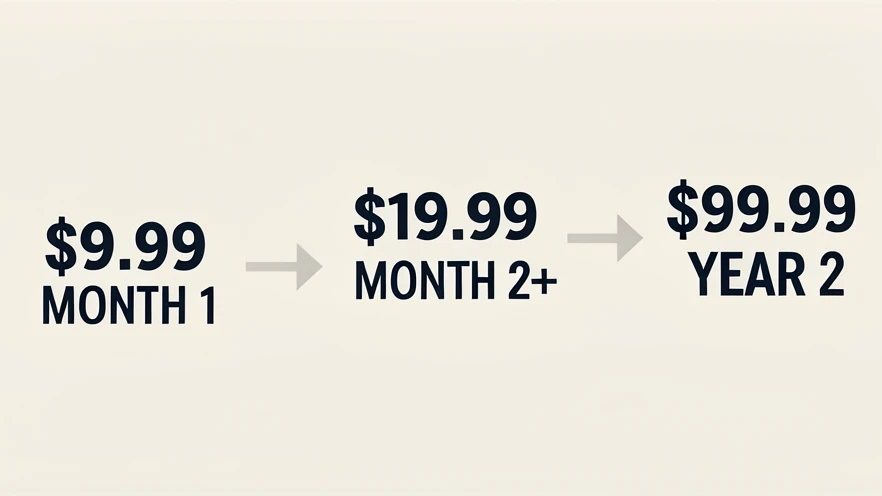
Pricing is where most buyer regret starts. The headline numbers look cheap, but they only hold for the first billing period. After that, both paid plans roughly double.
| Plan | Intro price | Price after intro | Credits | Watermark |
|---|---|---|---|---|
| Free | $0 | $0 | 2 swaps per day | Yes |
| Monthly | $9.99 first month | $19.99 / month | 20 per month (verify at checkout) | No |
| Annual | $49.99 first year | $99.99 / year | 240 per year | No |
The free tier is not a trial in any meaningful sense. You get 2 swaps per day, and every result carries a watermark, per aihaven.com. There is no free trial of the paid features, so you pay before you can judge whether the output meets your standard.
Watch the discount countdown too. One Trustpilot reviewer flagged a 'scammy 1 hour time limit 50% discount which is a total lie because timer resets.' The urgency is manufactured, not real, and it should not push your decision.
Credit counts do not agree across sources. fritz.ai lists 20 credits on the monthly plan, while other write-ups cite higher figures, including 100 and even 300 credits per month on magichour.ai. That gap is wide enough to change the value calculation, so confirm the exact credit allowance on the checkout screen before paying.
Credit Cost Calculator: How Far Do 20 Credits Actually Go
Twenty credits sound generous until you map them to real tasks. The cost per action swings hard: photos are nearly free, video burns credits fast.
| Task | Credit cost | What 20 credits buys |
|---|---|---|
| Video face swap | 1 credit / 15 sec | ~5 minutes of video |
| Photo face swap | 0.1 credit | 200 photo swaps |
| GIF face swap | 1 credit / GIF | 20 GIFs |
| Image-to-video | 1 credit / 5 sec | 100 seconds of video |
| Text-to-video | 1 credit / 5 sec | 100 seconds of video |
| AI image enhancement | 0.1 credit | 200 photos |
| AI Girl generator | 0.2 credit | 100 images |
Picture a social media manager's month: four 30-second videos burn about 8 credits, ten photo swaps cost roughly 1 credit, and five GIFs take 5 credits. That is 14 of 20 gone, with no room left for a re-render or a longer clip. Tight.
So the monthly plan cannot sustain regular video work. Five minutes of finished video per month is the hard ceiling. The annual plan stretches further at 240 credits a year and a better per-credit rate, yet it locks you into a relationship that gets pricier in year two.
Core Features: Video, Photo, GIF, and Bonus AI Tools
Video is the headline feature. Clips can run to 30 minutes or 1 GB, hold up to 6 faces, and export at a claimed 4K HD, with GPU acceleration rendering roughly a minute of footage in 9 to 10 seconds, per fahimai.com.
FaceShape Keeper vs FaceShape Transform
These two model options decide how the new face sits on the body. FaceShape Keeper holds the original face shape from your uploaded clip, which helps when the source geometry matters. FaceShape Transform reshapes the swapped face to match the source structure for a smoother blend, per the DeepSwap blog. Pick Keeper for likeness, Transform for seamless motion.
Stills and GIFs are cheaper and simpler. Photo swaps accept files up to 20 MB at 0.1 credit, GIFs up to 20 MB at 1 credit each. DeepSwap also supports a 3D VR format that FaceMagic does not offer, a genuine point of difference.
- Image-to-video and text-to-video generators, each billed at 1 credit per 5 seconds.
- AI image enhancement at 0.1 credit a photo, plus background removal and a cartoonize or anime filter.
- An AI Girl generator at 0.2 credits per image, and a video extend option for stretching short clips.
Batch upload handles up to 5 files at once, useful for repetitive jobs. One caveat runs through every feature: quality drops on fast motion, side profiles, poor lighting, and low-resolution source material. Feed it clean input or expect seams.
Output Quality: Honest Assessment Including Post-Version 2 Regression
Output is strong in a narrow band and shaky outside it. At its best, with well-lit front-facing footage that is static or slow-moving at high resolution, the swap holds up against other browser tools. Push it toward fast motion, side profiles, occlusion, or grainy source clips and the artifacts show.
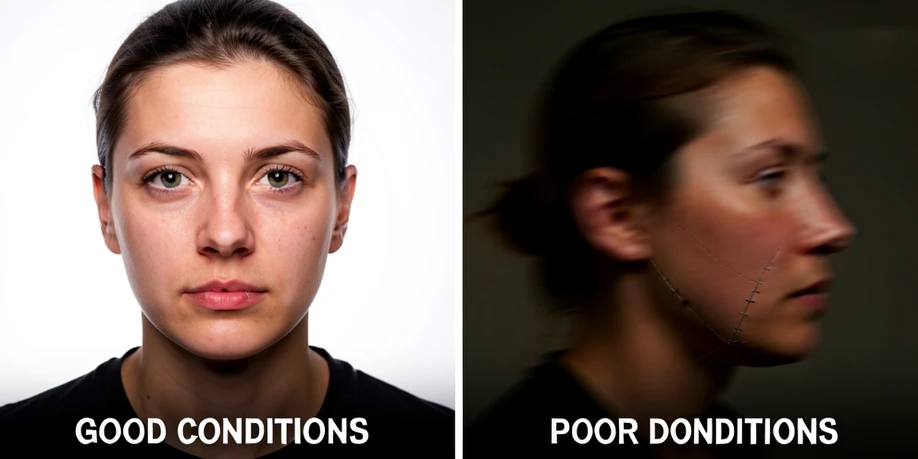
There is a wrinkle current reviews rarely mention. Several long-term users on Trustpilot report that quality fell after the Version 2 update, and DeepSwap has not publicly addressed the complaints.
It was originally very good until they upgraded to Version 2, which produces poorer quality results. Despite having this pointed out by many users there is no change.
Treat the marketing figures with care. The 90%-plus similarity claim is self-reported and has not been independently benchmarked, per unite.ai. The '4K HD' label is not something you can set yourself, and the actual pixel dimensions are never stated, which leaves the quality promise hard to verify.
Privacy and Data Handling: What DeepSwap Actually Does With Your Uploads
Your uploads do not live on DeepSwap's servers forever. Source files are kept for 30 days and generated results for just 7 days, per fritz.ai, so download anything you want to keep promptly.
On biometrics, the company is reassuring on paper. It states, 'We do not collect your biodata and will not use your data for any other purposes,' and unite.ai notes facial data is not used to train the model. You can delete uploads and results from the dashboard with one click, and full account deletion wipes all media.
Location is murkier. Servers sit in Ireland, where local authorities may access files if required, per fritz.ai. The jurisdiction story does not line up across pages: Trustpilot lists a Hong Kong address, fahimai.com places the company in New York, and the servers are Irish. For anyone uploading personal footage, that inconsistency matters.
Two more gaps. The privacy policy is dated 2021, old enough to question whether it reflects current practice. And no GDPR or CCPA compliance statement appears in any sourced material, despite the EU server location.
How to Cancel Your DeepSwap Subscription (Step-by-Step)
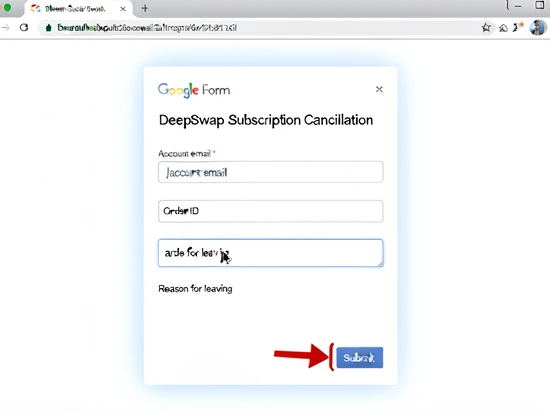
DeepSwap has no in-app cancel button. To stop billing you submit a specific Google Form with your account details, then wait for support to confirm. The company spells this out in its own Trustpilot replies.
Our official application is through filling in a specific Google Form with the account details.
- Find the Google Form link, which DeepSwap shares through email support or its Trustpilot replies.
- Enter your account email and the details the form asks for, then submit it.
- Wait for a confirmation message from support, and keep checking until one arrives.
Several users report being unable to cancel and seeing recurring charges hit after the introductory period ended. Protect yourself: screenshot the submitted form and watch your billing statements for the next cycle or two. Email is the only support channel, so there is no live chat to chase a refund.
DeepSwap vs Alternatives: When to Choose Something Else
If DeepSwap's limits pinch, a few tools cover the common escape routes. None replaces a full comparison, but the axis is simple: convenience, cost, or raw power.
- FaceMagic offers a dedicated mobile app, though DeepSwap beats it on video length, multi-face count, and the VR format.
- FaceFusion is free and open-source, with no watermark, but you install it locally and handle a technical setup.
- DeepFaceLab reaches film-grade results and costs nothing, at the price of a steep learning curve and capable hardware.
The decision shakes out cleanly. Choose DeepSwap when browser convenience and video up to 30 minutes are the priority. Choose an alternative when budget or privacy outranks ease of use.
Verdict: Is DeepSwap Worth It?
So, is DeepSwap worth it? For some users, comfortably. For others, not at the asking price.
It fits casual users who mostly swap photos, where 0.1 credit per swap makes even the monthly plan viable, and short-form video creators with steady, predictable volume. Twenty credits go a long way on stills.
It is a poor buy for anyone running frequent long-video swaps, since 20 credits equal only about five minutes of video a month. Skip it too if you cannot stomach a Google Form cancellation, or if you are privacy-sensitive about uploading personal footage to servers with unclear jurisdiction.
On pricing, the annual plan gives the better per-credit rate, but remember it climbs from $49.99 to $99.99 after the first year. On quality, DeepSwap stays competitive among browser tools in good conditions, though the post-Version 2 regression is a genuine concern for returning users.
Net verdict: a solid 3.5 out of 5 for casual and light-video use, dropping toward 2.5 for heavy video workflows. Whatever you decide, confirm the current price and credit count on the checkout page, along with the free-tier terms, before you commit, because the published figures shift.