
Supawork AI face swap, reviewed: what it really costs and whether 'free' is true
Short answer: Supawork is a fine free toy for the odd photo swap and a risky buy for anyone doing real video work. Photo swaps run 1 coin each, video swaps run 1 coin per second, and the free tier hands you 30 silver coins a day. So a single 60-second clip costs 60 coins, exactly double your daily allowance. The 'free, no sign-up' tagline you saw in ads does not survive contact with the actual product. This review reconciles the conflicting price tables, does the coin math, and weighs the marketing against dated user complaints before you upload a single face.
What Supawork AI face swap actually is
Supawork is an all-in-one web workspace, not a single-purpose app. The face swap sits inside a bundle that also covers AI video generation, image editing, professional headshots, a watermark remover, lip sync, and even a resume builder. One coin wallet pays for all of it. Nothing installs. You open the site in a browser, upload a file, and the tool does the work without any editing skill on your part.
The face swap itself reaches across formats. Photos, videos, and GIFs all run through the same engine, and it accepts multiple faces in one job for batch-style swaps on images. Supawork claims over a million signed-up users, and on the headshot side alone it reports more than 21 million generated images per its review coverage. Popular, then. Whether popular means good is the rest of this review.
Pricing decoded: coins, bundles and subscriptions
Here is why no two Supawork reviews quote the same prices. On February 22, 2025 the platform converted its old Credits system to Gold Coins, rebilling AI face video generation at 1 gold coin per second per its official updates log. Any pricing table written before that date talks in a currency the product no longer uses. Every figure below reflects the post-conversion coin system.
The free tier gives 30 silver coins daily, per the published spec. Beyond that you either buy coin bundles outright or subscribe annually. Bundles are pay-as-you-go and, importantly, those coins never expire, so an occasional user can top up once and forget about it. The per-coin price drops sharply as the bundle grows.
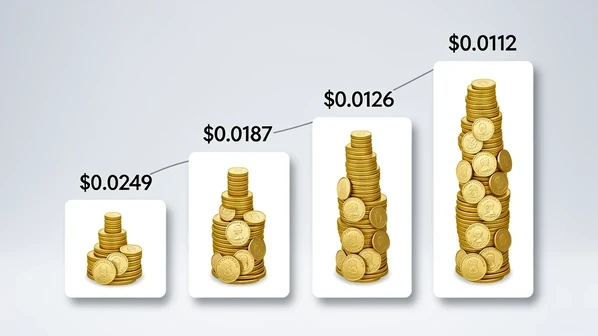
| Bundle | Price | Coins | Cost per coin |
|---|---|---|---|
| Starter | $9.99 | 400 | $0.0249 |
| Value | $14.99 | 800 | $0.0187 |
| Most Popular | $39.99 ($37.99) | 3,000 | $0.0126 |
| Power | $99.99 ($89.99) | 8,000 | $0.0112 |
The volume discount is real but mild: the biggest pack only cuts your per-coin cost by roughly half against the smallest. Subscriptions tell a different story. Lite runs $11.33 a month on annual billing for 1,200 coins monthly and caps face-swap video at 40 minutes with no watermarks. Pro is $17.50 a month for 2,500 coins and stretches the video cap to 83 minutes with priority processing. The monthly coin grant, not the headline price, is what you are really buying.
True cost of a face swap: how fast coins burn
Do the arithmetic and the value picture flips depending on what you make. A photo face swap costs 1 coin per image, so your 30 free daily coins cover 30 single-photo swaps. Generous. Video is where the wallet bleeds, because billing is 1 coin per second of footage.
Walk through one clip. A 60-second video swap costs 60 coins. That is double the entire 30-coin daily free quota, meaning you cannot finish even one short reel for free in a single day. Buy the $9.99 Starter pack and its 400 coins translate to about six minutes and forty seconds of swapped video. A handful of short clips and an afternoon of experimenting, and the pack is gone.
Two things make this worse in practice. There is no batch processing for video, so you feed files one at a time and wait between each. And nothing carries the cost down at volume the way the photo workflow does. For a creator pushing out daily video, the coin meter runs faster than the budget.
Is the 'free, no sign-up' claim real?
No, not as advertised. The marketing leans hard on 'free' and 'no sign-up', and that framing is what brings most readers to this page. Reality is narrower. The free tier does exist, but in practice it hands you a one-time signup bonus of 60 tokens plus the 30 daily tokens, which already tells you registration is part of the deal.
Users have said so bluntly. One Trustpilot reviewer flagged the exact gap between promise and product:
"says remove watermark (NO LOGIN NO LIMITS) not true, a message pop out come out all the time ask register an login, false advertising."
That sentiment is not an outlier. Supawork holds a 2.1 'Poor' rating across 11 reviews on Trustpilot at the time of writing. Small sample, yes, but the complaints cluster around the same theme: the door says open, then asks for your login. Treat the 'no sign-up' line as a hook, not a feature.
Quality and reliability: where swaps fail
Output quality is a gamble, and the brief is worth knowing before you pay. Results can look genuinely realistic, but they vary run to run on the same input. Run a job twice and you may get one clean swap and one warped face with off lighting. The product page advertises an HD photo swap in roughly 10 seconds, which holds for the easy cases.
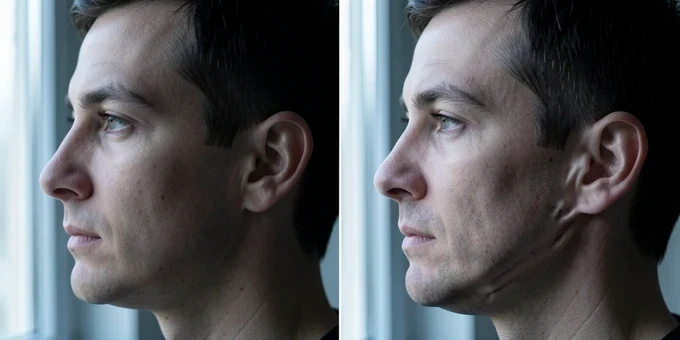
The easy cases are the catch. Swaps land most reliably on close-up, straight-on shots. Feed it an inconsistent angle or a side profile and the success rate drops hard. One Trustpilot user reported a refund refused after a roughly 50% success rate caused by exactly those angle problems. Read that as a warning: the failures are not free, and the policy does not bend for them.
The watermark remover follows the same pattern. It cleans static logos from images well enough, then stumbles on motion, leaving artifacts where a logo moves across video frames. Capable on the simple job, unreliable on the hard one.
Limits, data handling and privacy
Most reviews skip the fine print, so here it is. Video face swap accepts files up to 60 minutes or 1GB, whichever you hit first. For images the tool takes JPG, PNG, WEBP, and HEIC up to 20MB, one face only, with a ceiling of 10 images per session. Those caps are roomy for casual work and limiting only if you batch heavily.
Where your face photo lives afterward matters more. If you are not logged in, uploaded files are deleted within 2 hours. Log in and that stretches to 24 hours. Subscribers get private storage, and paid plans add extra cloud privacy protection for assets during editing. The data does sit on Supawork's servers in the meantime, which is the trade for a browser tool that needs no install.
One more detail privacy-minded readers should clock: Trustpilot lists the company's location as Anguilla. That jurisdiction is worth weighing if you care where a service holding your biometric likeness is legally based.
Verdict: who should buy, free-tier, or skip
Supawork earns a qualified recommendation, sharply split by use case. As a free toy for casual and social creators doing the occasional photo swap, it is genuinely fun and the 30 daily coins go a long way on stills. That is the sweet spot. Stay on the free tier, keep to close-up shots, and you will rarely feel the ceiling.
- Best fit: casual creators living on the free quota and the odd photo swap.
- Approach with caution if you edit video, because coin burn is brutal and there are no refunds for failed jobs.
- Privacy-conscious users should weigh the cloud retention windows and the Anguilla jurisdiction before uploading a face.
- If you need consistent, predictable video swaps, a dedicated tool such as DeepSwap or Vidnoz is the safer call.
The honest line: go in eyes open. Supawork's conflicting old prices, fast coin drain on video, no-refund stance, and the gap between its 'free, no-sign-up' pitch and forced registration all make it hard to recommend for heavy or paid use. For a quick photo swap on a sharp, front-facing shot, though, it does the job and costs you nothing.